
Think on your feet.
Auto Mouse Jiggler Mover is a tiny menu bar app for when you step away to think, pace or stretch. One click turns the icon green. At the interval you choose, the cursor draws a gentle 6‑point circle and lands exactly where it started.
- Free to download
- macOS 13.5 or later
- No account
On Windows? Get notified when the Windows version is ready →
“Simple & easy to use. Just what I needed!”
On your phone? It’s a Mac app. Send it to your Mac

What’s in the film (text version)
“Step away.” A green ring becomes the menu bar icon, and the real menu opens: Stop, Jiggle Interval, Cancel Stop Timer, “Stops in: 8h 30m”. Think. Pace. Stretch. Stay engaged during breaks. A magnifier shows the tiny circle the cursor draws and how it returns to the same spot. Pick your rhythm: 10 seconds to 24 hours. Set a stop time (in-app purchase). In Settings: it starts when the app opens, pauses when you lock the screen, waits while you type, and lets go when you move the mouse. Set it. Forget it. It ends on the app icon, with the note that timers over 25 min and some features require in-app purchase or subscription. Sequences shortened; the circle is shown enlarged.
Five-star Mac App Store reviews from six countries on four continents
- ★★★★★
Love icon in the bar. Very minimal and clean. Easy to use and works.
andremanoel · Brazil - ★★★★★
Does the job usefully
Ayurjoti · India - ★★★★★
Fa quello che promette e lo fa molto bene
TeoBoza · Italy · “Does what it promises, and does it very well.”
Click the icon. Then grab the mouse.
This is the app’s real menu. Start it, rest your hand, and watch the cursor draw its circle. Move the mouse mid‑circle and it lets go.
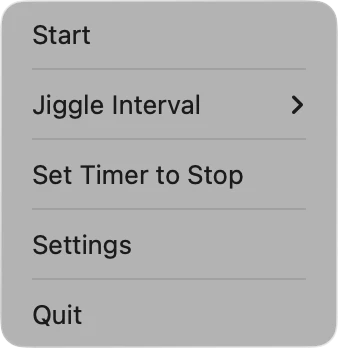
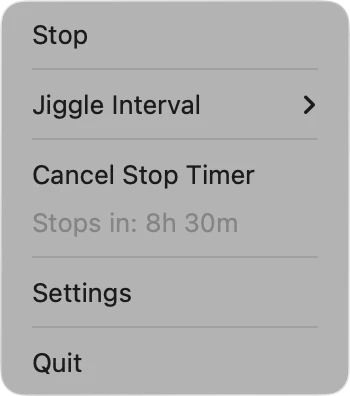
- 1Click the icon in the menu bar
- 2Start: the icon turns green
- 3Rest and watch the circle
- 4Grab the mouse mid‑circle
Click the icon in the menu bar to open the real menu.
That’s the whole app: small, quiet, one click away. Get it free on the Mac App Store
Time is shortened here: every interval runs in 3 s, and the circle is slowed down so you can see it. The real one takes 0.6 s.
“I love this app because it has no pop-ups ... It works well, small movements that are nonchalant and end up at the same spot where it begins. Amazing and just convenient. Good tool.”
Three small things. That’s the whole app.
No window to manage, no Dock icon. It sits in your menu bar, does one tiny thing on schedule, and gets out of your way.
-
One click. The icon turns green.
Choose Start and the icon turns green, so you know at a glance it’s running. Choose Stop and it’s back to black.
 Stopped
 Running
-
Pick how often.
From every 10 seconds to once a day, or your own time, sorted into the list. Prefer no movement? Choose Never and turn on Mac API activity. andremanoel from Brazil loves that it works
without actually moving my cursor
.- Never
- 10s
- 1m
- 5m
- 7m
- 1h
- 5h
- 24h
- Custom…
-
Set when it stops.
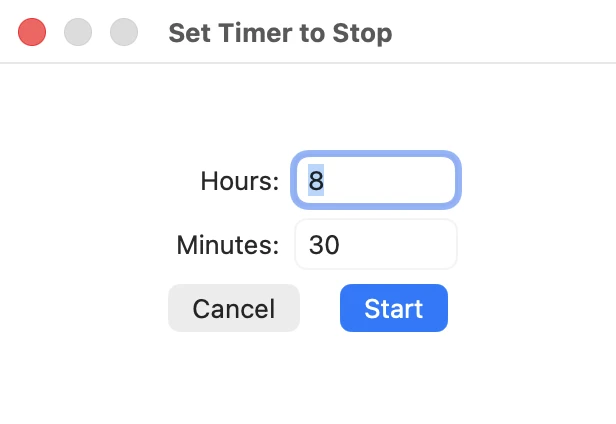
Set Timer to Stop takes hours and minutes, and the menu counts down for you. When time is up, it stops on its own.
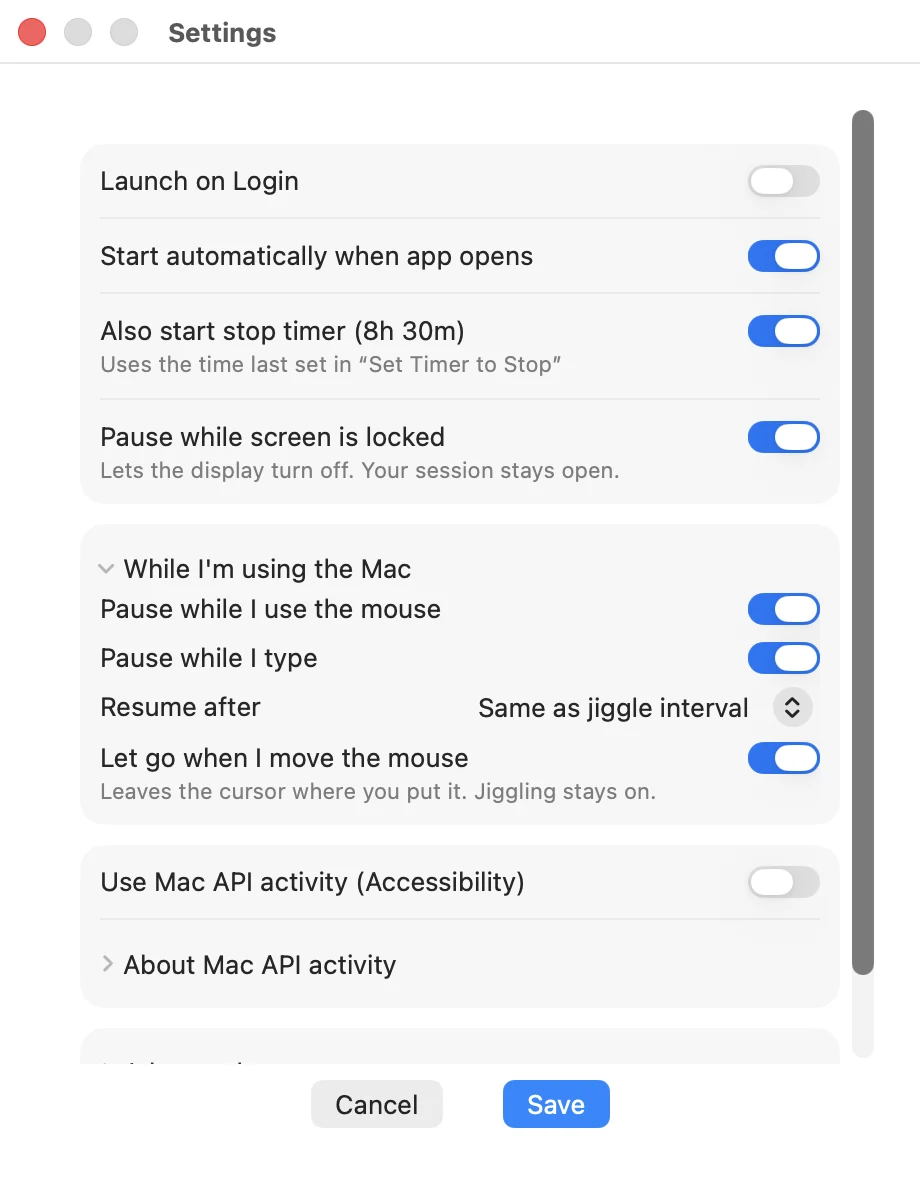
You asked in your reviews. Version 1.5.4 answers.
New
Open the app and it starts on its own, with the stop timer you used last time.
New
The display can turn off as usual. Your session stays open.
New
It pauses while you use the mouse or type, and resumes after the same time as your interval, or a time you choose.
New
Move the mouse mid‑circle and it stops right there, leaving the cursor where you put it.
Plus a simpler Settings window, with the details tucked away until you need them.
Small app. Kind words from four continents.
Real five-star Mac App Store reviews, quoted as written.
“Love icon in the bar. Very minimal and clean. Easy to use and works.”
“Simple & easy to use. Just what I needed!”
“Does the job usefully”
“es todo lo que necesito. Muchas gracias.”
“It’s everything I need. Thank you very much.”
“Fa quello che promette e lo fa molto bene”
“Does what it promises, and does it very well.”
- Brazil
- United States
- Italy
- Argentina
- India
- Singapore
Shown with the reviewer’s nickname and country, as on the Mac App Store. Translations ours.
It’s a Mac app. Send it to your Mac.
Auto Mouse Jiggler Mover runs on Macs with macOS 13.5 or later. Send yourself this page and install it from your Mac in one click.
Free to download
An optional in‑app purchase or subscription adds extended stop timers and some extra features. The App Store shows the price in your currency first.
Runs on your Mac only
Everything happens locally. No account to create, and the app collects no data. Privacy policy
macOS 13.5 or later
Installs from the Mac App Store and lives in the menu bar. It needs one Accessibility permission to move the pointer.
Is it free?
Yes, it’s free to download. An optional in‑app purchase or subscription unlocks extended stop timers and some extra features. The App Store shows the price in your own currency before you buy anything.
Will it move my cursor away from what I’m doing?
No. Each move is a tiny 6‑point circle that ends exactly where it started. It pauses while you use the mouse or type, and with “Let go when I move the mouse” turned on, grabbing the mouse mid‑circle stops it at once and leaves the cursor where you put it.
Can it work without moving the cursor at all?
Yes. Set Jiggle Interval to “Never” and turn on “Use Mac API activity (Accessibility)” in Settings. The app then works through the macOS Accessibility API and the pointer does not move.
Why does it ask for Accessibility permission?
macOS only lets apps you approve move the pointer, so the app asks once in System Settings › Privacy & Security › Accessibility. You can turn it off there at any time.
Which Macs does it run on?
Any Mac with macOS 13.5 or later. It installs from the Mac App Store and lives in the menu bar, with no Dock icon.
What data does it collect?
The app collects no data and needs no account; it runs locally on your Mac. This website uses Google Analytics to count visits. Read the privacy policy.
Is there a Windows version?
Not yet. We’re considering one: leave your email and we’ll tell you when it’s ready.
How do I stop it?
Click the menu bar icon and choose Stop, or use Set Timer to Stop and it ends on its own. Quit is always one click away in the same menu.
Your next break starts with one click.
Put the little circle in your menu bar. Step away to think, pace or stretch, and come back to the same spot.
- Free to download
- Optional in‑app purchase
- macOS 13.5 or later
On Windows? Get notified when it’s ready →